Best Roblox Executors of 2026: PC and Mobile Compared
The executor you pick decides which scripts you can run, how often things break and how exposed your account is. This comparison covers the names that show up most on RblxScript in 2026, built from each project’s public information and from what users report on script pages.
Short answer: which executor should you use?
On Android, start with Delta: it is the executor most authors list and it has its own install guide on this site. Codex and Ronix are the usual backups. On Windows, Solara is the common free pick and Wave is the paid one. On iPhone there is no easy option in 2026.
What we looked at
RblxScript does not run a lab and did not benchmark these apps. The notes below use signals anyone can check. We read what each project says about itself, how many scripts on the site list the executor as compatible, and the problems people describe in the comments.
- Install friction: how many steps before you can run anything.
- Update speed: how fast a new build appears after a Roblox client update, according to the project.
- Script coverage: how many scripts on RblxScript name the executor in their author-declared compatibility list.
- Cost: free, free with a key, or paid.
Mobile executors
Most of our visitors play on a phone, and our executors directory reflects that. Right now it lists three Android executors, sorted by downloads from this site.
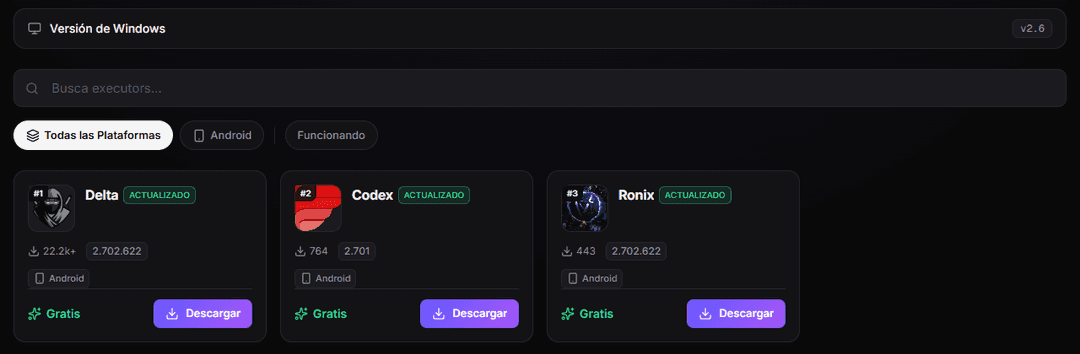
Delta: the default on Android
Delta is the executor authors mention most for Android. It is a sideload, so Google Play does not host it. You download the APK, allow the install and grant a couple of permissions on first launch. After that you open Delta, open Roblox and paste the script. New builds usually arrive a few days after a Roblox client update.
The MatLumber channel has a full walkthrough of the 2.735 build, including where to download it and the install screens you will see.
Codex and Ronix: the backups
Codex is the second most common name on script pages. Its Android build installs like Delta. There have been iOS versions too, but they depend on sideloading apps and the method changes often. Ronix is newer and smaller. It is worth keeping as a plan B for the day your main executor lags behind a Roblox update.
Desktop executors (Windows)
Solara: the common free pick
Solara runs on Windows 10 and 11 and costs nothing. For a long time it used a free key that expired every 24 hours. Some status trackers now list it as keyless, so check the official Discord before you assume either way. It handles lighter scripts well. Very heavy hubs sometimes need a stronger executor.
Wave: the paid option
Wave sells access by time: weekly and longer plans. You pay for a cleaner interface, fewer crashes and quicker fixes after updates, according to its users. Paying does not protect your account. A ban wave hits paid and free executors the same way.
What about KRNL?
KRNL was one of the best-known free executors for years. Its original team shut down the Windows version after Roblox rolled out Hyperion, its anti-cheat. Many sites still use the KRNL name in 2026, but nobody can show they come from the original developers. Treat any "KRNL download" as unverified.
Quick comparison table
| Executor | Platform | Cost | Best for |
|---|---|---|---|
| Delta | Android | Free | Your first executor on a phone |
| Codex | Android (iOS varies) | Free | Backup when Delta lags |
| Ronix | Android | Free | Second backup |
| Solara | Windows | Free | Light and medium scripts on PC |
| Wave | Windows | Paid | Heavy hubs and long sessions |
| KRNL | Windows | Discontinued | Avoid unverified copies |
How to choose in four questions
- Do you play on an Android phone? Install Delta and keep Codex as a backup.
- Do you play on a Windows PC and want to spend nothing? Try Solara.
- Do your favorite scripts crash on free executors? That is when a paid option like Wave makes sense.
- Are you on iPhone or Mac? Expect friction. Read our mobile vs PC guide before you install anything.
One habit helps with any executor: check the compatibility list on the script page before you copy. Authors say which executors they used. RblxScript does not test them itself, so the comments are your second check.
Common questions
Is a paid executor safer than a free one?
For your device, maybe a little: a paid project has a reputation and a payment trail to protect. For your Roblox account, no. The ban risk comes from breaking the rules, and that is the same whether the executor cost five dollars or nothing.
Why did my executor stop working overnight?
Almost always because Roblox shipped a client update. The executor needs a new build to match it. Wait a day or two and check the project’s announcements. Our guide on why scripts get patched explains the full cycle.
Official rules and next steps
Using or sharing exploits to help yourself or others gain an unfair advantage anywhere on the platform.
Roblox Community Standards
The official rules that executors break. Violations can lead to suspension or account termination.
Executors directory
Download links and platform info for the executors listed on RblxScript.
Download Delta for Android
The Delta page on RblxScript, with the install steps and the current build.
Mobile vs PC executors
The tradeoffs between phone and Windows executors, question by question.
Staying safe with Roblox scripts
Account and device protections to set up before your first install.