Most people who lose a Roblox account to "a script" did not lose it to the script. They lost it to the website that hosted it, to a fake executor or to a page that asked them to log in. This guide separates the real risks from the rumors.
The threat model in plain words
When you run a community script you add two pieces of code to your device: the executor and the script it runs. They fail in very different ways. The executor stays installed and has wide permissions on your phone or PC. A script only runs while a Roblox session is open, and inside that session it can mostly do what the executor allows.
Judging by the messages users send us, most "my account got stolen" stories come from one of these four causes:
- A fake executor downloaded from a site that copies the real one.
- A "cookie logger" disguised as a script that sends your session to someone else.
- A phishing page that asks you to log into Roblox to "verify" a key.
- A reused password that leaked from another site.
Posting misleading links for the purpose of gaining unauthorized access to others’ accounts or information, either on Roblox or elsewhere (i.e., phishing).
Account protections to turn on first
Do this before you install anything. It takes five minutes and it is the difference between a scare and a lost account.
- Turn on 2-Step Verification with an authenticator app. Roblox requires a verified email first.
- Use a strong password that you do not use anywhere else, especially not on Discord or your email.
- Every couple of months, log out of all other sessions from the security settings.
- If you do not trade items, turn trading off so nobody can empty your inventory in one click.
Add 2-Step Verification to your account (Roblox Support)
The official guide to turning on 2-Step Verification, including the authenticator app method.
Getting the executor from the right place
Always start from the project’s official source. Our executors directory lists the download links we use. Compare the domain with the one in the project’s official Discord, and type it by hand the first time. Links from TikTok comments, Discord DMs or Roblox profile bios are the most common impostor channels.
The MatLumber channel shows the full Delta download from start to finish, so you know what the real flow looks like before you try it.
Permissions: what is normal and what is not
On Android, an executor usually asks for storage and for permission to show over other apps. It has no reason to read your contacts, your SMS or your accounts. On Windows, a SmartScreen warning the first time is common for unsigned programs. New background processes you do not recognize after the install are not normal.
Before you open an APK, let Google Play Protect or your antivirus scan it. On PC, run a scan on the downloaded file before the first launch.
Reading a script page critically
Every script page on RblxScript shows data you can use before copying: the author, the executors the author says they used, a working or patched status, the last updated date and community comments. RblxScript does not review or test scripts before they go live, so the page is your first filter.
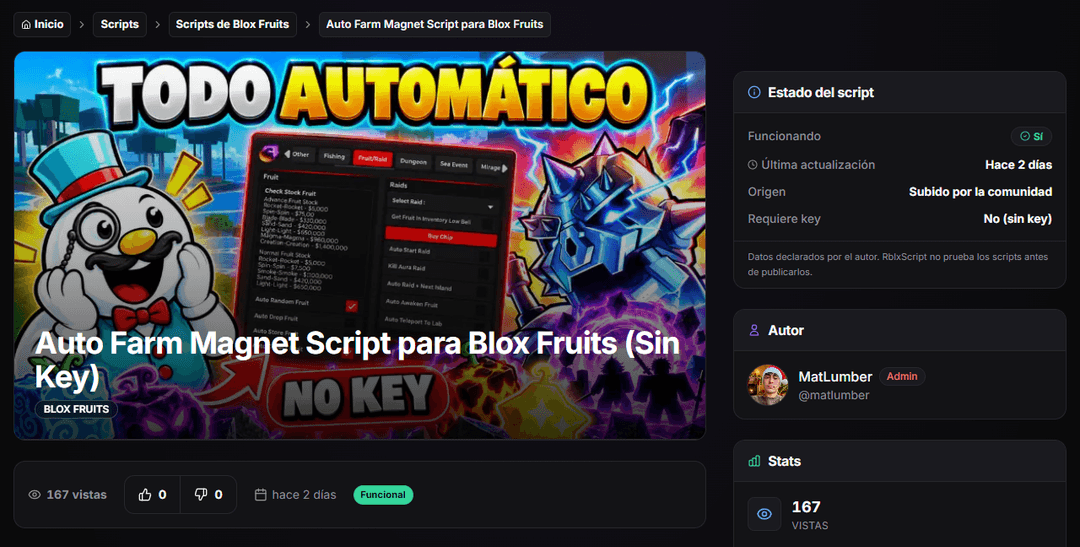
- Check the last updated date. Anything older than a big Roblox update may already be patched.
- Read the comments. Working scripts get complaints when they break; total silence usually means few people use it.
- Look at the author’s other uploads. A long list of abandoned scripts is a warning.
- Distrust vague descriptions like "best script ever". A real description names its features.
After the session
Close the executor when you finish. On Windows, if it keeps running in the background it can stay attached when Roblox opens again. On a phone, swipe it out of the recent apps. Every couple of weeks, look at your active sessions in the Roblox security settings. If you see one you do not recognize, end it and change your password.
If something goes wrong
- Log out of all sessions right away and change your password from a different device.
- Run a full antivirus scan, remove browser extensions you do not trust and scan again.
- Turn on 2-Step Verification if it was off.
- Contact Roblox Support quickly. Its help article says compromised accounts must be reported within 30 days.
If a script you copied from RblxScript was the cause, email hubloxapp@gmail.com with the page link so an admin can take it down.
My account was hacked: what do I do? (Roblox Support)
Roblox’s official steps for a compromised account, including the 30-day reporting window.
Executors directory
The executors listed on RblxScript with the download links we use.
Trust signals for script authors
How to tell a reliable author from a one-off upload.
Best executors of 2026
Side-by-side breakdown of the most common executors on PC and mobile.