A Beginner's Guide to Luau in Roblox Studio
You do not need to be a programmer to copy a script. But knowing a little Luau is the difference between guessing what a script does and actually reading it. This guide gets you there in about an hour.
What is Luau?
Luau is the programming language Roblox uses for every game on the platform. It started as Lua 5.1, a small language created in Brazil in the 1990s. Over the years Roblox turned it into its own version, added optional types and made it faster. Luau is open source today and has its own site.
A small, fast, and embeddable programming language based on Lua with a gradual type system.
Why should you care? Because code that looks strange is usually just newer Luau. Things like local x: number = 5, type declarations or x += 1 are not typos. Plain Lua does not have them, but Luau does.
Five ideas that unlock everything else
1. Tables are the only collection
Luau has one collection type: the table. It works as a list, as a dictionary and as an object. When you see local players = {}, that variable could become a list of players, a map of names to scores or a record with fields. The code around it tells you which.
2. Functions are values
You can store a function in a variable, put it inside a table or pass it to another function. The line Players.PlayerAdded:Connect(function(player) ... end) is exactly that: a function handed to an event, to run each time someone joins.
3. Services are the doors to the engine
Almost every script starts by asking for services with game:GetService(). Workspace holds the 3D world. Players holds the people in the server. ReplicatedStorage holds things shared between server and client. RunService gives you code that runs every frame. Learn these four and the first lines of most scripts make sense.
4. Events and connections
Most Roblox code reacts to something: a player joining, a key press, a part being touched. Scripts attach a function to an event with :Connect(). When the script ends, a clean one calls :Disconnect(). A messy one leaves connections running and eats CPU in the background.
5. The task library
task.wait, task.spawn and task.delay replace the older wait() and spawn(). They work with the Roblox scheduler, which is why modern scripts use them. If a script still uses the old versions, it is probably old too.
Cheat sheet: words you will meet in scripts
| In the code | What it means |
|---|---|
| local | Creates a variable that only exists in this block |
| LocalPlayer | You, the player running the script |
| Character / HumanoidRootPart | Your avatar and the part that marks its position |
| FireServer | Sends a message from your game to the server |
| getgenv() | An executor-only table for sharing settings between scripts |
| pcall | Runs code and catches errors so the script does not crash |
That getgenv() line is a good clue, by the way. It does not exist in Roblox Studio. Only executors add it, so seeing it tells you the script was written for an executor.
The line you will see most: loadstring
Open almost any script page on RblxScript and the code is one line. It looks something like loadstring(game:HttpGet("https://...")). Here is what it does, from the inside out.
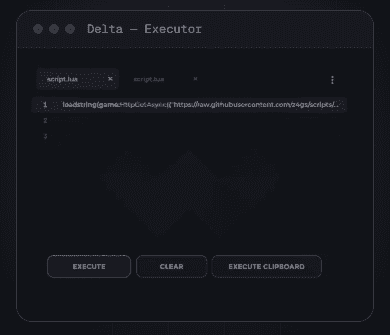
- game:HttpGet(url) downloads text from that address. The text is Luau code.
- loadstring(text) turns that text into a function.
- The final () runs the function.
So the real script is not on the page. It lives at the URL. That has two consequences. The author can update it without changing the page, which is why one-liners keep working after fixes. And the author can also change what it does at any moment, without you noticing.
How to read a real script in five minutes
- Read the first ten lines. They show which services the script uses and which interface library it loads.
- Look for the words Connect and while true do. That is where the script does its work.
- Search for HttpGet, request or webhook. They mean the script talks to the internet. A webhook to Discord that sends your data somewhere is a red flag.
- Check the end for cleanup, like Disconnect or Destroy. Careful authors include it.
Where to learn it properly
Two free sources are enough to start. The Luau site has the language reference. The Roblox Creator Hub has a scripting course that starts from zero, inside Roblox Studio. Studio is free, so you can write your own code in your own game without breaking any rule. After a weekend with both, most community scripts will stop looking like noise.
Luau documentation on the Roblox Creator Hub
The official Roblox guide to Luau: variables, tables, functions and types.
Intro to scripting (Roblox Creator Hub)
Roblox’s own beginner tutorial for writing your first script in Studio.
luau.org
The official site of the Luau language, with the reference and the type system guide.
Browse community scripts
Now that you can read Luau, see what authors publish.
Keyless scripts explained
What "no key" means and why some scripts ask for one.