Solara Executor Explained: Setup, Features, Troubleshooting
Solara is one of the Windows executors authors on RblxScript list most often. It is free, it is simple, and it is also one of the most copied names on fake download sites. This guide covers the install, the first script and the errors you are likely to see.
What is Solara?
Solara is a free executor for Windows 10 and 11. It attaches to the Roblox desktop app and runs the scripts you paste into its editor. It became popular after Hyperion, the Roblox anti-cheat, knocked out many older Windows executors.
Two things to know up front. It is lighter than paid options like Wave, so very heavy hubs sometimes fail on it. And it has changed its access model over time: for a long stretch it used a free key that expired every 24 hours, while some status trackers now list it as keyless. Check the official announcements to see which applies today.
Before you install
- Find the official site through the project’s Discord and type the address by hand. Solara is not in our executors directory right now, which lists Android executors.
- Ignore links in video comments, DMs and "Solara download" ads. Fake copies of Solara are common.
- Expect Windows SmartScreen or Defender to react. Unsigned programs trigger it. Only allow the file if you are sure it came from the official source.
- Run a scan on the file before you open it.
Install walkthrough
- Download the installer from the official site.
- If Windows blocks it, right-click the file, open Properties and check "Unblock" only if you trust the source.
- Run the installer and let it finish. It may download extra files the first time.
- Open Roblox and join a game. Wait until your character appears.
- Open Solara. If it asks for a key, follow the steps in its own window, never on a page that asks for your Roblox login.
Running your first script
Every script page on RblxScript has a "How to use" section with the same basic steps. They work for Solara too.
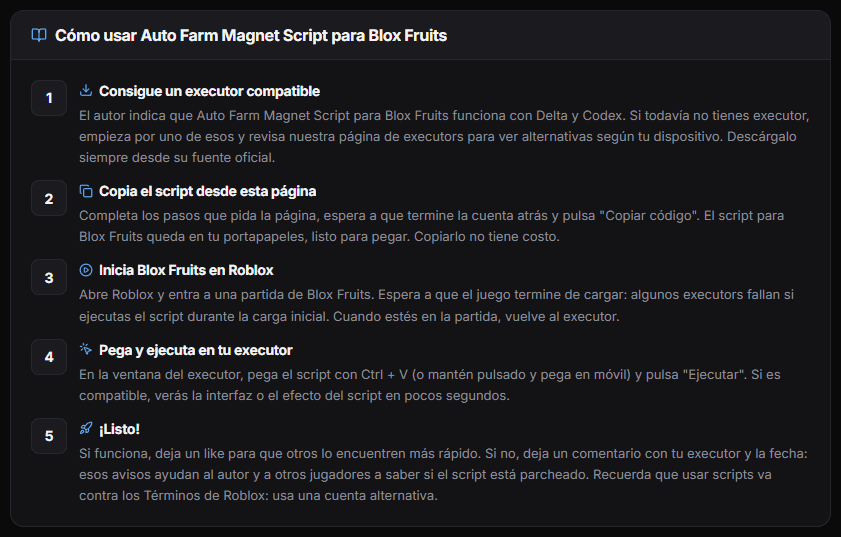
In short: copy the script, paste it into the Solara editor and press Execute. Most scripts open a panel inside the game within a few seconds. If nothing happens after ten seconds, look at the Solara console. Most failures print an error there.
Common problems and what they mean
Solara does not attach
Usually Roblox was not fully open yet. Close both, open Roblox, join a game, then open Solara. If it still fails right after a Roblox update, Solara probably needs a new build. Check its announcement channel and wait.
The key is rejected
If your version uses a key, keys expire. Get a new one. If a fresh key fails, you may have copied a space at the start or end. Copy it again carefully.
The script runs but nothing happens
The script may be patched, or it may be too heavy for Solara. Check the comments and the last updated date on its page. Then try a lighter script for the same game to see whether Solara itself works.
Roblox closes when you execute
This often points to an executor and client mismatch after an update. Do not keep retrying on the same account. Wait for a Solara update.
| Symptom | Most likely cause | What to do |
|---|---|---|
| Does not attach | Roblox not loaded, or a new client update | Reopen in order, or wait for a build |
| Key rejected | Expired key or extra spaces | Get a new key, copy carefully |
| No panel appears | Patched or heavy script | Check comments, try a lighter script |
| Roblox crashes | Version mismatch | Stop and wait for an update |
Common questions
Is Solara a virus?
The real Solara is flagged by antivirus programs because of what executors do: they inject code into another program. That alone does not make it malware. The problem is that fake "Solara" files look identical in the download folder. That is why the source matters more than the warning.
Does Solara work on Mac or on a phone?
No. Solara is Windows only. On Android, look at Delta or Codex. On Mac there is no well-known option, and many people use a phone instead.
Solara or Wave?
Start with Solara because it is free. If the scripts you care about keep failing or crashing on it, that is the moment to look at a paid option like Wave. Neither one protects your account from a ban.
Official sources and next steps
Microsoft Defender SmartScreen (Microsoft Learn)
Microsoft’s explanation of the warning you see when you open an unsigned program.
Roblox Community Standards
The official rules on exploits. Breaking them can lead to account suspension.
Best executors of 2026
How Solara compares with Wave and the mobile executors.
Browse scripts
Find scripts whose authors list Solara as compatible.