How Scripts Get Published on RblxScript (and What We Don't Check)
Anyone with an account can upload a script to RblxScript, and it goes live the moment the upload finishes. There is no review queue, and nobody at RblxScript runs the script first. This page describes the process exactly as it works, so you know how much (and how little) a script page can tell you.
The process in one table
| Stage | What happens | Who does it |
|---|---|---|
| Upload | Title, game, code and details are submitted | The author |
| Automatic checks | Upload limit, text cleanup, size limit, duplicate check | The site, automatically |
| Publication | The script goes live instantly, with no prior review | Nobody reviews it |
| Feedback | Comments, likes and dislikes | Other users |
| Corrections | Edit, mark as not working, hide or delete | The author or an admin, by hand |
Step 1: Upload and automatic checks
To upload, a user must be signed in and provide at least a title, the script code and the game name. Before saving, the site runs a few automatic checks and nothing else:
- An upload limit of 10 scripts per hour per account, so one account cannot flood the site.
- A cleanup of the title and description that strips unsafe HTML.
- A size limit of 500 KB for the code, and 2 MB for the thumbnail image.
- A duplicate check: the upload is rejected if a live script already has the same title for the same game, or exactly the same code.
That is the whole list. The code is not scanned for malicious patterns, and the script is not run anywhere before it is published. A script that passes these checks is only a script that is not a duplicate and not too big.
Step 2: What the author declares
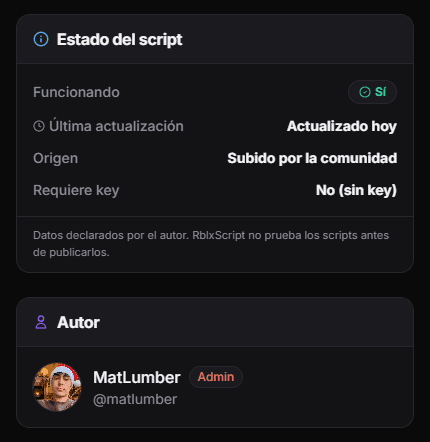
The author fills in everything you see on the page: the game, the description, which executors they say they used, whether it needs a key, whether it works on mobile, and whether it currently works or is already patched. All of it is self-reported. When a page says "compatible with Delta" or "no key", that is what the author claims.
Some pages also show a longer description written with AI from the author's title and feature list. That text helps you read the page. It is not a review and nobody checked it against the code.
Step 3: Published instantly
The script is public as soon as the upload completes. New and long-standing authors follow the same process: there is no stricter path for new accounts and no pre-approval step for anyone. The upside is speed. Scripts break with game updates every week, and a fixed version goes live the minute its author uploads it.
The cost of that speed is on you as a reader. A brand-new page from a brand-new account has had zero eyes on it besides the author.
After publishing: comments, votes and admins
Once a script is public, other users can comment and leave a like or dislike. Those comments are the fastest warning system the site has: players usually write "patched" with their executor and the date long before anyone updates the page. The author can edit the page or switch its status to patched at any time.
RblxScript admins can edit a page, mark it as not working, hide it, or delete it by hand. They do this when they notice a problem or receive a report. Pirated content, scripts that steal accounts or personal data, and code aimed at payment systems are not allowed, and they are removed as soon as we find out about them.
How to report a script
There is no report button on script pages yet. To flag a script, email hubloxapp@gmail.com or message us on Discord with the link and what you saw. The same address handles DMCA notices.
What we do not do
- We do not test scripts on any executor or account, before or after publishing.
- We do not scan code for malware, cookie loggers or remote payloads.
- We do not verify the compatibility, key or mobile information the author provides.
- We cannot predict how Roblox's detection systems will react when you use a script.
How to Report Rule Violations (Roblox Support)
How to use Report Abuse inside Roblox games and on the Roblox site.
Cheating and Exploiting (Roblox Support)
Why Roblox treats exploits as a Terms of Use violation.
About RblxScript
Who runs the site, how it is funded and how to contact us.
Trust signals for script authors
Since nobody reviews uploads, this is how to judge who is behind a script.
Upload a script
Want to publish your own script? This is where the upload flow starts.